

The Role and Impact of ADO API in Modern Database Development
Introduction
In today’s data-driven landscape, APIs act as the glue between applications and storage systems. The ActiveX Data Objects (ADO) interface remains one of the most enduring choices for uniform data access. This overview explores why ADO is still relevant, what it offers, and how it shapes everyday database work.
What is ADO API?
Definition and Background
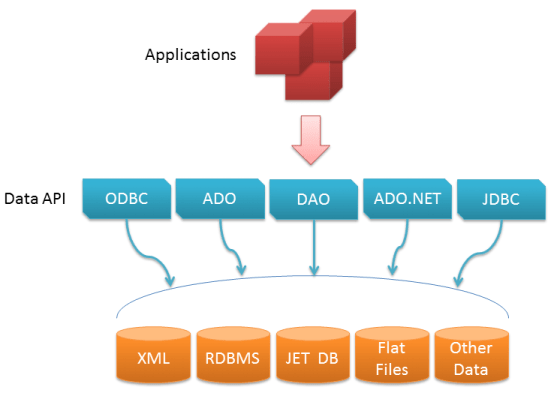
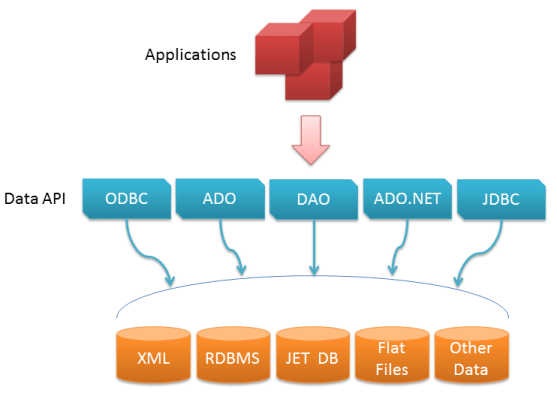
ADO is a collection of programmable objects that open a common door to relational tables, flat files, and XML streams. First shipped in the late nineties, it abstracts vendor differences so the same code can target multiple engines with minimal change.
Key Features of ADO API
Developers praise ADO for its shallow learning curve and concise object model. Highlights include:
– Connection Management: one-liner strings connect to popular engines without proprietary libraries.
– Command Execution: run ad-hoc SQL, parameterized queries, or stored routines through the same Command object.
– Recordset Navigation: scroll, filter, sort, or batch-update rows with a cursor model that feels intuitive in most languages.
– UI Binding: grid and form controls can be wired directly to a live Recordset, cutting boilerplate code.
The Impact of ADO API on Database Development
Enhanced Productivity
A single API surface replaces multiple vendor SDKs, trimming both training time and script length. Teams deliver features faster because data-access logic stays portable across projects.
Improved Flexibility
Swapping back ends during prototyping or scaling no longer means rewriting queries; only the connection string changes. This freedom encourages iterative design and smoother migrations.
Scalability
Connection pooling, server-side cursors, and batch updates let the same components serve departmental tools and high-traffic services alike, provided best practices are followed.
Case Studies and Real-World Applications
Desktop Productivity Suites
Macros and add-ins inside spreadsheet and database packages often rely on ADO to pull live data, merge reports, or schedule refreshes without manual export steps.
Web Development
Classic ASP and early .NET sites frequently used ADO to fetch inventory, user profiles, or content fragments, proving that lightweight scripting and enterprise data can coexist.

Challenges and Limitations
Compatibility Issues
64-bit environments and cloud-native drivers sometimes expose legacy dependencies, requiring careful testing or wrapper layers.
Performance Concerns
Large result sets or chatty loops can tax memory; thoughtful indexing, pagination, and cursor choices keep response times acceptable.
Conclusion
Despite its age, ADO continues to lower the barrier between applications and data. Its concise model, broad support, and gentle learning curve still justify its place in many toolkits, especially where rapid integration outweighs cutting-edge features.
Future Directions

Microsoft’s data stack has evolved toward Entity Framework and OLE DB successors, yet ADO’s patterns linger inside newer abstractions. Understanding its principles helps developers appreciate current data layers—and occasionally fall back on the original when simplicity is paramount.
In short, ADO remains a pragmatic bridge: not flashy, but dependable, and still capable of moving data from anywhere to anywhere with minimal fuss.